


ChatGPT Projects are one of the most useful—and most misunderstood—features inside ChatGPT. They’re designed to help you keep long-term work organized, reduce repetition, and get more consistent results from the AI. In this guide, you’ll learn what ChatGPT Projects are, how they work, when to use them, and how professionals actually use them in real workflows.
What Are ChatGPT Projects?
ChatGPT Projects are structured workspaces inside ChatGPT that let you group related conversations, files, and instructions under a single context.
Instead of treating every chat as a fresh start, a project allows ChatGPT to work with:
- Ongoing context
- Uploaded reference files
- Project-specific instructions
Projects are built into ChatGPT by OpenAI and are available on supported plans.
In short: a project turns ChatGPT from a chat tool into a workspace.
Why ChatGPT Projects Matter
Without projects, most users repeat themselves:
- Re-explaining goals
- Re-uploading files
- Re-setting tone and format
Projects remove that friction.
They matter because they:
- Improve response consistency
- Save time across repeated tasks
- Reduce context loss in long workflows
- Make ChatGPT usable for serious work
If you’re using ChatGPT daily and not using projects, you’re working harder than necessary.
How ChatGPT Projects Work
Each project contains four core elements:
1. Project Chats
All conversations inside a project are grouped together. ChatGPT can reference earlier chats within the same project, which improves continuity.
2. Project Instructions
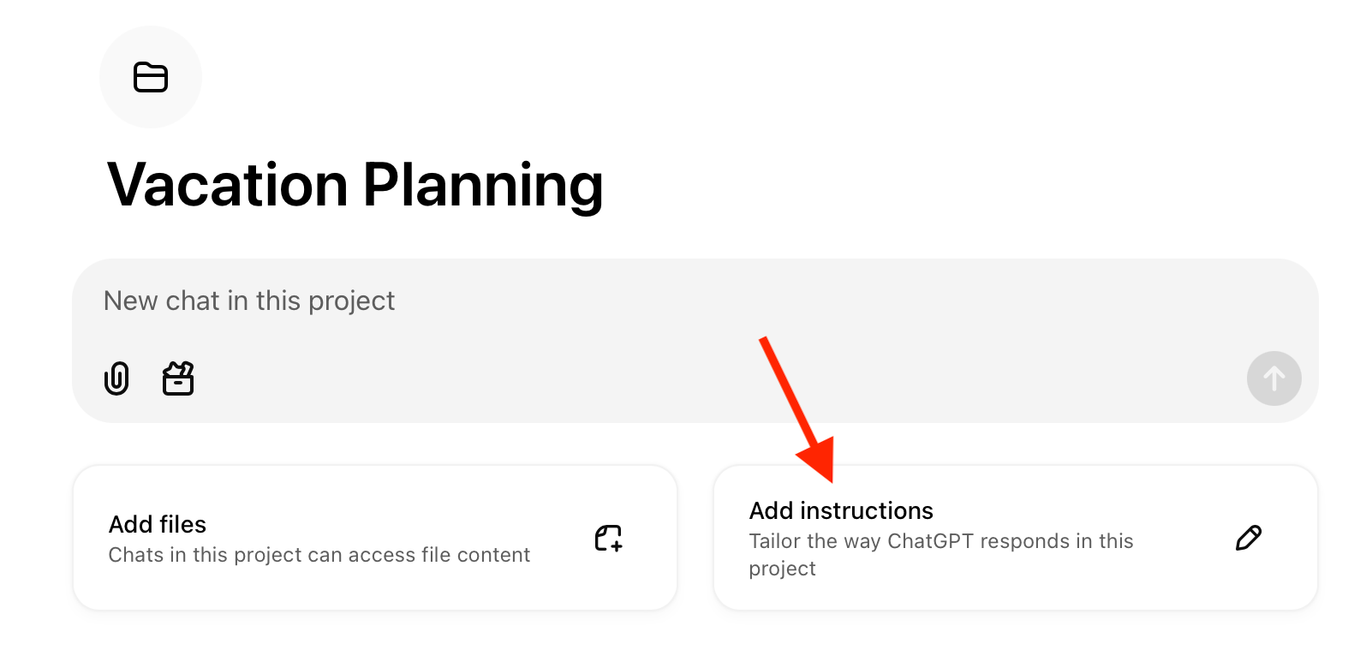
These are custom instructions that apply only to that project.
For example:
- Writing style rules
- Output format requirements
- Role definitions
This prevents you from repeating the same instructions in every prompt.
3. Knowledge Files

You can upload PDFs, documents, spreadsheets, or notes. ChatGPT can reference these files whenever you ask questions inside the project.
4. Persistent Context
Within reasonable limits, ChatGPT maintains context across sessions inside the project—unlike standalone chats.
When You Should Use a Project (and When You Shouldn’t)
Use a project when:
- You’re working on the same topic repeatedly
- You need consistent tone or format
- You rely on reference documents
- The work spans days or weeks
Don’t use a project when:
- You’re asking a one-off question
- The task is disposable
- No reference material is needed
Projects are for ongoing work, not casual queries.
How to Create a ChatGPT Project (Step by Step)
- Open ChatGPT
- Click New Project in the side panel
- Name the project clearly (e.g., “AI Insider Content”)
- Add project instructions
- Upload reference files if needed
- Start chatting inside the project
From this point on, every chat inside the project follows the same rules and context.
How Professionals Use ChatGPT Projects
Below are real, practical use cases—not theory.
1. Content Creation Projects
Example: Blog or editorial workflow
Typical setup:
- Instructions: tone, structure, SEO rules
- Files: style guide, keyword list, past articles
- Chats: outlines, drafts, edits
Result:
- Consistent voice
- Faster drafting
- Fewer revisions
This is how you should manage long-form content, especially if you’re publishing regularly. For a broader workflow view, see our guide on how to use ChatGPT in 2026.
2. Research & Analysis Projects
Example: Industry research
Typical setup:
- Instructions: neutral analysis, cite sources
- Files: reports, PDFs, datasets
- Chats: summaries, comparisons, insights
Result:
- Structured research
- Better synthesis across documents
- Less hallucination due to grounded context
3. Learning & Skill-Building Projects
Example: Learning Python or data analysis
Typical setup:
- Instructions: teach step by step, avoid jargon
- Files: syllabus, notes
- Chats: explanations, exercises, reviews
Result:
- Personalized tutoring
- Continuity across sessions
- Faster learning curves
4. Business & Operations Projects
Example: Internal documentation or SOPs
Typical setup:
- Instructions: formal tone, bullet clarity
- Files: policies, procedures
- Chats: drafts, revisions, summaries
Result:
- Cleaner documentation
- Consistent formatting
- Reduced manual effort
Best Practices for Using ChatGPT Projects
Keep Projects Focused
One project = one goal.
Avoid mixing unrelated work.
Write Clear Project Instructions
Ambiguous instructions lead to inconsistent output. Be explicit.
Update Files Periodically
Outdated files lead to outdated answers.
Don’t Overload Context
Too many unrelated files can confuse the model. Curate what you upload.
Common Mistakes to Avoid
- Creating too many projects for minor tasks
- Forgetting to add instructions
- Treating projects like folders instead of workspaces
- Expecting perfect memory across all chats
Projects improve consistency—not perfection.
Limitations of ChatGPT Projects
Projects still have limits:
- Context is not infinite
- Files must be relevant and readable
- Memory can drift over very long timelines
They are powerful, but not a replacement for human oversight.
How ChatGPT Projects Fit Into Modern AI Workflows
Projects are the foundation for:
- Advanced prompting
- Multi-step workflows
- Agent-based automation
As AI tools become more action-oriented, structured context becomes essential. Projects are OpenAI’s answer to that need.
FAQs
What are ChatGPT Projects used for?
ChatGPT Projects are used to organize long-term work by grouping chats, instructions, and files under a single context.
Are ChatGPT Projects free?
Availability depends on your ChatGPT plan. Some advanced features may require a paid plan.
Can ChatGPT remember information inside a project?
Yes, ChatGPT can maintain context across chats within a project, within system limits.
Can I upload files to a ChatGPT Project?
Yes. You can upload documents, PDFs, and spreadsheets for reference within the project.
Final Takeaway
ChatGPT Projects are not optional if you’re serious about using AI productively. They turn scattered conversations into structured workflows and reduce friction across repeated tasks.
If you want consistent, professional-grade output from ChatGPT, projects are where that starts.
For a complete foundation, read our pillar guide on how to use ChatGPT in 2026, then apply these workflows in your own projects.
More ChatGPT Guides for 2026
- ChatGPT New Features March 2026: Every Update Explained
- ChatGPT Canvas in 2026: How I Edit 5,000-Word Articles in 10 Minutes
- ChatGPT Voice Mode: I Used It for 30 Days While Driving
- Stop Using ChatGPT Like This (Do This Instead)
- 7 ChatGPT Features That Save 20+ Hours Every Week
- How to Use ChatGPT in 2026: Complete Guide for Students