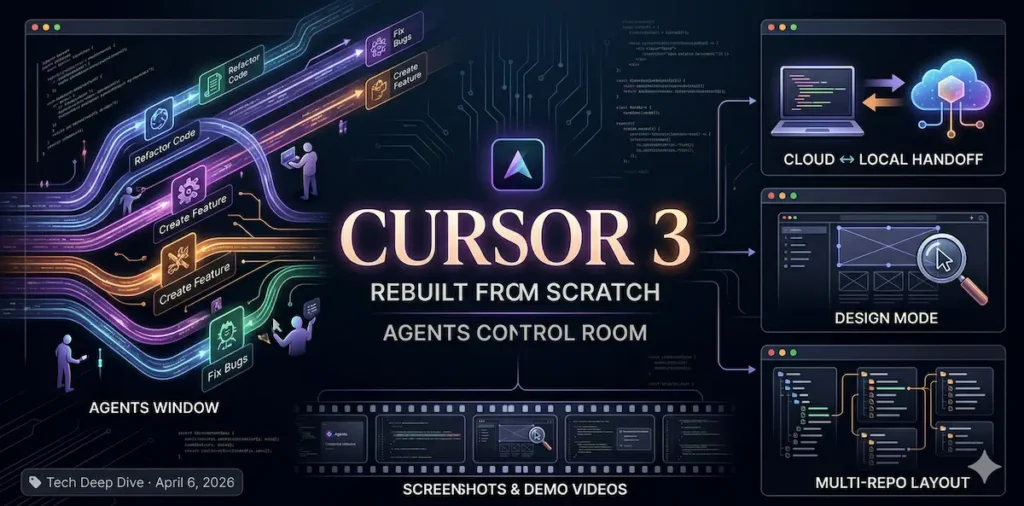

Cursor 3 Is Here — and It Changes How You Code
The AI coding tool just rebuilt itself from scratch. Here’s every major feature, explained simply — and why developers everywhere are paying attention.
If you’ve heard of Cursor, you probably know it as a smart code editor — like Microsoft Word, but for programmers, with an AI assistant built in. Cursor 3 is something different. It’s not just an editor anymore. It’s a control room for AI agents that write code on your behalf. Think less “AI helping you type” and more “AI doing the work while you check in.”
What Even Is Cursor 3?
Cursor started as a fork of VS Code — the world’s most popular code editor. Over time, it layered in AI features. But version 3 is a break from that history. The team built the entire interface from scratch, centered around a new concept: agents.
An agent, in this context, is an AI that doesn’t just answer questions — it takes actions. It reads your code, writes new files, runs tests, fixes bugs, and reports back. Cursor 3 lets you run many of these agents at once, across multiple projects, from anywhere.
The 5 Features That Matter Most
Your AI Control Room
A new central hub where you can launch, monitor, and manage multiple AI agents working in parallel — across different projects, all at once.
Never Lose Progress Again
Start a task on your laptop, push it to the cloud when you need to step away, then pull it back to test. The work keeps running — with or without you.
Point & Fix UI Bugs
Click directly on a visual element in your browser to give the AI precise feedback. No more describing “the button on the left side of the header.”
Work Across Projects
Agents can now span multiple codebases at once — useful for large teams where features touch many different repositories simultaneously.
Proof of Work, Automatically
Cloud agents auto-generate screenshots and short demo videos of what they built. You can verify the output visually without ever running the code yourself — a huge time-saver for reviews and standups.
The Cloud ↔ Local Handoff, Step by Step
This is the feature generating the most buzz — and it’s surprisingly simple to use.
Update Cursor to 3.0 — free update if you’re already a user.
Press Cmd+Shift+P and open the Agents Window.
Start a long-running task locally — a big refactor, new feature, test suite, etc.
Hit “Push to Cloud” before closing your laptop. The agent keeps going in Cursor’s cloud.
Check progress from anywhere at cursor.com/agents — your phone, browser, Slack, GitHub.
When you’re back, pull it local, test the result, make edits, and you’re done.
“In the last few months, our profession has completely changed.”
— Jonas Nelle, Head of Engineering at Cursor, speaking to WIRED
How Does It Stack Up?
Cursor 3 enters a three-way race with Anthropic’s Claude Code and OpenAI’s Codex. Each takes a different approach to AI-assisted coding.
| Tool | Best For | Interface | Cloud Agents |
|---|---|---|---|
| Cursor 3 | Visual IDE, multi-project orchestration | GUI (built from scratch) | ✦ Yes |
| Claude Code | Deep logic, terminal-native workflows | Terminal / CLI | ✦ Partial |
| OpenAI Codex | Fire-and-forget async tasks | Web + CLI | ✦ Yes |
One real pressure point: OpenAI and Anthropic offer heavily subsidized plans (reportedly $1,000+ of usage for $200/month). Some developers have switched over for the value alone. Cursor is reportedly seeking new funding at a $50 billion valuation to stay competitive.
The Bottom Line
Cursor 3 is the most visually complete AI coding environment available right now. If you want to see your agents working — manage them, pause them, push them to the cloud, watch them produce output — no other tool matches it today.
Whether you’re a developer or just someone tracking where software is headed: the era of “typing code line by line” is ending. Cursor 3 is one of the clearest signals yet of what comes next.