
Last Updated: 21 March 2026 | aiinsider.in
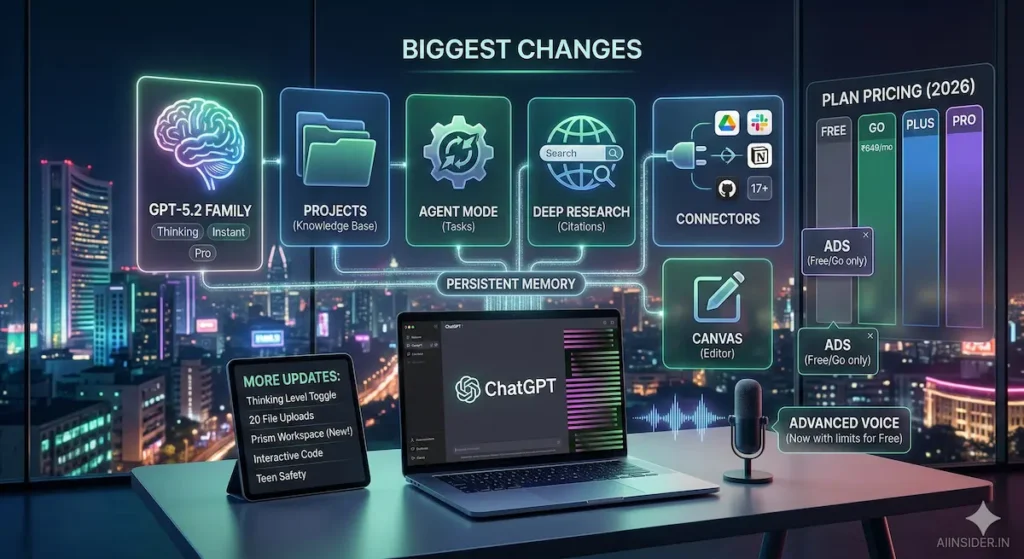
⚡ Quick Answer: ChatGPT March 2026 Updates
| Current version | GPT-5.4 (launched March 5, 2026) |
| Free users get | GPT-5.2 Instant + Advanced Voice Mode (now free) |
| Biggest new feature | Agent Mode — ChatGPT operates your computer for you |
| India pricing | ₹399/month (Go) · ₹999/month (Plus) · ₹8,499/month (Pro) |
| Must-try features | Projects · Canvas · Deep Research · Memory · Connectors |
📅 Updated March 21, 2026 — scroll down for the full breakdown of every feature
ChatGPT in March 2026 is not the same product you used in 2023. It’s not even close.
In the last 18 months, OpenAI shipped more updates than in the entire history before that. GPT-5.4 launched March 5. Agent Mode can now operate your computer. Memory works across every chat. Connectors pull your actual Google Drive and Gmail. And there’s now a ₹399/month plan built for India.
If you’re still using ChatGPT like a search engine — type question, get answer, close tab — you’re using about 10% of what’s available. This guide covers every major update through March 2026, explained simply. Bookmark it. We update every month.
Table of Contents
1. The New Models: GPT-5, 5.1, 5.2, 5.3, and Now GPT-5.4
This is the biggest change. In 2025, OpenAI moved from the GPT-4 family to GPT-5. Here is the full progression:
GPT-5 (Launched mid-2025) The original GPT-5 was a landmark release — noticeably smarter at writing, coding, and factual accuracy than GPT-4o. It has since been retired from ChatGPT and replaced by newer versions.
GPT-5.2 (Current everyday model) GPT-5.2 Instant is currently the model you get on the Free and Go plans. It is fast, capable, and significantly better than anything from the GPT-4 era. GPT-5.2 Thinking — the deeper reasoning version — is still available in Legacy Models for paid users until June 5, 2026.
GPT-5.4 — Released March 5, 2026 (Latest) This is the biggest model update of 2026 so far. GPT-5.4 is OpenAI’s most capable and efficient frontier model to date. Here is what makes it different:
- It combines reasoning, coding, and agentic workflows into a single model — previously these were spread across separate models
- It incorporates the coding capabilities of GPT-5.3-Codex, making it significantly better at writing, debugging, and building software
- Native computer use — GPT-5.4 can now control a browser or desktop application on your behalf, not just answer questions about them
- Upfront thinking plan — for complex tasks, it now shows you its plan before executing, so you can redirect it mid-response without starting over
- 33% fewer factual errors compared to GPT-5.2, and 18% fewer overall response errors
- 1 million token context window via the API — the largest OpenAI has ever offered
- On GDPval (professional knowledge work benchmark across 44 occupations), GPT-5.4 matches or exceeds industry professionals in 83% of comparisons, up from 70.9% for GPT-5.2
Who gets GPT-5.4: GPT-5.4 Thinking is available now to ChatGPT Plus, Team, and Pro users. GPT-5.4 Pro is available to Pro and Enterprise users only. Enterprise and Edu users can enable it via admin settings.
What happened to older models? GPT-4o, GPT-4.1, GPT-4.1 mini, OpenAI o4-mini, and GPT-5 (original) have all been retired from ChatGPT. You cannot select them anymore. GPT-5.2 Thinking will be retired on June 5, 2026.
2. Plans and Pricing — March 2026
ChatGPT now has four consumer plans:
| Plan | Cost | What You Get |
|---|---|---|
| Free | ₹0 | GPT-5.2 Instant (limited), web search, basic memory, Projects (up to 5 files), Advanced Voice Mode (time limited), Canvas, 2 images/day |
| ChatGPT Go | ~₹399/month (India) | 10x more messages, larger file uploads, extended memory, image creation. GPT-5.2 Instant only. No Connectors or Tasks. |
| ChatGPT Plus | $20/month | GPT-5.4 Thinking, Connectors, Tasks, Deep Research, Codex, 25 files per project. Best for daily work. |
| ChatGPT Pro | $200/month | GPT-5.4 Pro, maximum memory and context, 40 files per project, early feature access. For power users. |
ChatGPT Go — The India Update ChatGPT Go launched in India in August 2025 and is now available in 98+ countries. In India, the price is approximately ₹399/month (it was briefly promoted lower and the promo ended January 21, 2026). It uses GPT-5.2 Instant with 10x more usage than the free tier. Note: Go is not available in the US, UK, Canada, or Australia.
Ads on Free and Go As of early 2026, OpenAI is testing ads for Free and Go users in the US. Ads are shown based on your current conversation topic but advertisers never see your actual chat content. You can dismiss ads, hide them, or manage ad preferences at any time. Plus, Pro, Business, and Enterprise remain completely ad-free. Ads are not shown to users predicted to be under 18.
3. GPT-5.4 Thinking — The Feature That Changes How You Work
GPT-5.4 Thinking in ChatGPT introduces something new: an upfront plan.
When you give it a complex task — write a financial model, build a web app, research a topic in depth — it now shows you its plan of attack before it starts. You can read the plan, adjust it, redirect it, or tell it to take a different approach. Then it executes.
This is more useful than it sounds. Previously, if ChatGPT went in the wrong direction, you had to wait for it to finish and then ask again. Now you can catch it early. This makes long-form work — 3,000 word articles, detailed reports, complex code — significantly faster to get right.
Available on chatgpt.com and Android now. Coming soon to iOS.
4. Memory — Now Works Across All Your Chats
Memory received major upgrades throughout 2025. Here is what it can do now:
- Memory applies across all your chats, not just new ones — ChatGPT can reference things you told it weeks ago
- You can set up memory for specific projects only, keeping different contexts separate
- You can search and sort what ChatGPT knows about you from a single panel
- You can manually add memories — type “Remember that I am preparing for UPSC 2026 and struggle with Economy topics” and it stores it permanently
- Full control: tell it to forget anything, or turn memory off entirely
How to use it: Settings → Personalization → Memory → Manage Memories
Free users have access to basic memory. Plus and Pro users get significantly more memory capacity and project-specific memory.
5. Projects — Your Personal Knowledge Base Inside ChatGPT
Projects became significantly more powerful through 2025 and early 2026. As of March 2026:
- Free users get Projects with up to 5 file uploads per project
- Plus and Go users get up to 25 files per project
- Pro, Business, Enterprise get up to 40 files per project
Projects now let you build a living knowledge base by adding sources from multiple places:
- From apps: Paste a link to a Slack channel or Google Drive file and it is added directly as a project source (Plus/Pro only)
- From chats: Save any useful ChatGPT response into your project so outputs become reusable
- Custom colours and icons: New in early 2026 — you can now colour-code and give icons to different projects to stay organised
Think of Projects as giving ChatGPT a dedicated folder for each of your ongoing work areas. Everything in that folder is available as context in every chat within that project, without re-uploading files each time.
6. Connectors — ChatGPT Reads Your Actual Files
Connectors let ChatGPT connect to your real work tools. Once connected, it can search your files, read your messages, and pull data without you copy-pasting anything.
Apps supported as of March 2026:
- Google Drive (from June 2025)
- Gmail
- Google Calendar
- Slack
- Notion
- GitHub
- Linear
- FactSet, MSCI, Third Bridge, Moody’s (new — March 2026, for financial data)
- 17+ more integrations
Important: Connectors are available on Plus and Pro plans only. Free and Go users do not have access. EU, Switzerland, and UK users cannot use Gmail, Slack, Notion, or Dropbox connectors due to privacy regulations — GitHub and Linear work globally.
How to set up: Settings → Connectors → Connect your apps
7. Agent Mode — ChatGPT Does Tasks For You
Agent Mode (formerly Operator) lets ChatGPT take multi-step actions in a browser on your behalf. Available for Plus and Pro users globally since July 2025.
What it can do:
- Fill out online forms
- Book tickets or appointments
- Research and compile information from multiple websites
- Navigate web apps and perform repetitive tasks
- Native computer use with GPT-5.4 — now significantly more capable than the original release
With GPT-5.4, Agent Mode has become meaningfully better. The model can now control a computer at the OS level — not just browse the web — making it useful for tasks that involve desktop apps, file management, and multi-app workflows.
Important caveat: Always review what Agent Mode has done before confirming important actions. It works best for well-defined tasks with clear endpoints.
8. ChatGPT for Excel — Brand New (March 5, 2026)
Launched the same day as GPT-5.4, ChatGPT for Excel is now available in beta for Enterprise users. It embeds ChatGPT directly inside Microsoft Excel, allowing you to:
- Build complex financial models from a description
- Analyse data sets and generate insights
- Update and restructure spreadsheets using plain language
- Automate repetitive spreadsheet tasks
A Google Sheets version is also in beta. This is one of the most practical launches of 2026 for anyone who works with data regularly.
9. Deep Research — Proper Research Reports
Deep Research lets ChatGPT spend significantly more time searching and thinking before giving you a response. Instead of a quick summary, it produces structured, multi-source reports. Current features:
- Pause mid-search to refine what you are looking for
- Integrates with Connectors — can pull your internal documents alongside public web sources
- Export reports as PDFs
- Free and Go users now have access with usage limits
Best use cases: Competitive research, understanding a new topic in depth, preparing for interviews, market analysis, academic research.
10. Canvas — Full Document Editing Inside ChatGPT
Canvas is a dedicated writing workspace that opens alongside your chat. You work on a document together with ChatGPT in real time.
Current capabilities:
- Write and edit long-form documents collaboratively
- Build interactive apps and call APIs directly from Canvas
- New shortcut (2026): Paste content into ChatGPT and instantly open it in Canvas via the shortcut in the upper right corner of the composer
- Canvas is now out of beta and available to all users
For content creators: Paste a rough draft into Canvas and tell ChatGPT what to fix. It edits inline, explains its changes, and lets you accept or reject each one. Useful for editing 3,000–5,000 word articles efficiently.
Note: Canvas is available on web and desktop. Mobile Canvas is still listed as coming soon.
11. Tasks — Scheduled Reminders and Automated Reports
Tasks (Plus and Pro only, not Free or Go) let you set up recurring or one-time scheduled actions:
- “Give me an AI news summary every weekday at 5 PM”
- “Remind me about my passport renewal on March 15”
- “Send me a weekly summary of my project notes every Sunday”
You receive push notifications or emails when tasks complete. Plus users get 40 tasks per month. Pro users get 400. You can have 10 active tasks running simultaneously.
12. Advanced Voice Mode — Now for Free Users Too
Advanced Voice Mode (AVM) — real spoken conversations with ChatGPT, not just text-to-speech — expanded significantly in 2025:
- Free users now have access with time limits
- Voice responses improved: better at following instructions, uses real-time web search
- The Voice experience in the macOS app was retired in January 2026 to consolidate development — Voice continues on chatgpt.com, iOS, Android, and Windows
The voice quality is noticeably better than earlier versions — natural back-and-forth, can interrupt mid-sentence, and uses real-time web search to answer current questions.
13. ChatGPT Thinking Level Toggle
Since September 2025, Plus users can control how much thinking time ChatGPT spends on an answer:
- Light — Faster responses for simple questions
- Standard — Default balance
- Extended — Deeper reasoning for complex problems
With GPT-5.4, this toggle now also controls the upfront planning feature — Extended mode gives you the full thinking plan before execution.
14. File Uploads — Now Up to 20 Files at Once (Free), More on Paid
You can now upload up to 20 files in a single message (up from 10). Expanded file type support has also been added, including source files, logs, and configuration files.
For Projects specifically:
- Free: 5 files per project
- Go and Plus: 25 files per project
- Pro and Enterprise: 40 files per project
15. Conversation Branching — New in 2026
You can now branch conversations in ChatGPT. Hover over any message → click More Actions (⋯) → select “Branch in new chat.” This starts a separate conversation from that point, so you can explore different directions without losing your original thread.
Available for all logged-in users on web.
16. Visual Responses — Smarter Answers That Are Easier to Scan
From January 30, 2026, ChatGPT answers to everyday questions may now include at-a-glance visuals. Important people, places, products, and concepts are highlighted inline — tapping one opens a side panel with key facts and trusted sources. Similar to Google’s knowledge panels, but inside your chat. Rolling out globally on web, Android, and iOS.
17. Prism — New Research Workspace
Prism is a free, AI-native workspace for research writing and collaboration inside ChatGPT, powered by GPT-5.2. Designed for:
- Long-form content and research documents
- Team collaboration
- Research synthesis across multiple sources
Available to personal accounts. Organisation support is listed as coming soon.
18. Safety and Teen Protections
OpenAI added a set of safety features through late 2025 and early 2026:
- Age prediction: ChatGPT now attempts to estimate if a user is under 18 and adjusts content accordingly. Ads are not shown to predicted-minor users.
- Lockdown Mode (February 13, 2026): Gives users the ability to lock down their account with additional security controls.
- Elevated Risk labels: New labels flag potentially high-risk information in responses.
Which Plan Should You Choose in March 2026?
| Your situation | Best plan |
|---|---|
| Occasional use for writing or learning | Free — GPT-5.2 Instant, web search, Canvas, Projects, Memory |
| Daily use but $20 is too expensive (India/SE Asia) | Go (~₹399/mo) — 10x more usage, image creation |
| Work use: content, code, research, spreadsheets | Plus ($20/mo) — GPT-5.4 Thinking, Connectors, Deep Research, Tasks |
| Full-time professional or researcher | Pro ($200/mo) — GPT-5.4 Pro, maximum everything |
Frequently Asked Questions
Is ChatGPT free in March 2026? Yes. The free tier is more capable than ever — GPT-5.2 Instant with usage limits, web search, basic memory, Projects, Advanced Voice Mode, Canvas, and 2 AI images per day.
What is GPT-5.4 and do I need it? GPT-5.4 is the newest and most capable ChatGPT model, released March 5, 2026. It is available on Plus and Pro plans. If you use ChatGPT for serious work — writing, coding, research, data analysis — yes, it is a meaningful upgrade over GPT-5.2. For casual use, GPT-5.2 Instant on the free tier is more than enough.
What is the difference between GPT-5.2 Instant and GPT-5.4 Thinking? GPT-5.2 Instant is fast and optimised for everyday tasks. GPT-5.4 Thinking is the deep reasoning model — it thinks longer, plans before executing, and is significantly better at complex analysis, coding, and multi-step problem-solving. GPT-5.4 Thinking responses take longer but produce better results for hard tasks.
Does ChatGPT remember previous conversations? Yes, if Memory is enabled. ChatGPT remembers things across all your chats — not just within a single session. You can view, edit, and delete memories at any time from Settings → Personalization → Memory.
Can ChatGPT browse the internet in 2026? Yes. Web search is available to all users including Free. ChatGPT can retrieve real-time information and check current news. Deep Research (available on all plans with usage limits) takes this further with structured multi-source research reports.
What is ChatGPT Go and is it available in India? ChatGPT Go is a low-cost plan available in India at approximately ₹399/month. It gives 10x more usage than the free tier using GPT-5.2 Instant. It is not available in the US, UK, Canada, or Australia.
Will there be ads in ChatGPT? OpenAI is currently testing ads for Free and Go users in the US only. Plus, Pro, Business, and Enterprise are completely ad-free. Ads are not shown to users under 18.
What happened to GPT-4o? GPT-4o has been retired from ChatGPT. All users are now on the GPT-5 family.
Final Thoughts: Where ChatGPT Stands in March 2026
The GPT-5.4 release on March 5, 2026 is a genuine step change — not just a version bump. For the first time, a single mainstream ChatGPT model combines strong reasoning, professional-grade coding, and the ability to actually operate a computer or browser autonomously. That is a different kind of tool than what existed even six months ago.
If you are still using ChatGPT the same way you used it in 2023 — typing a question, getting an answer, starting a new chat — you are using about 10% of what is available today. The high-leverage moves are simple: set up Memory, create a Project for your main work area, connect it to Google Drive, and try Deep Research once.
The users getting the most out of AI right now are not the ones with the most technical knowledge. They are the ones who treat ChatGPT as a persistent tool — not a one-off search engine.
Related Post
- 8 Hidden ChatGPT Features in 2026 Most Students Never Use
- ChatGPT vs Claude vs Gemini vs Perplexity (2026): Tested All 4
- Stop Using ChatGPT Like This (Do This Instead) | 2026 Method
- 7 ChatGPT Features That Save 20+ Hours Every Week
- How to Use ChatGPT in 2026: Complete Guide for Students
- ChatGPT Canvas in 2026: How I Edit 5,000-Word Articles in 10 Minutes
- ChatGPT Projects in 2026: How to Save 100+ Prompts You Use Daily